Language
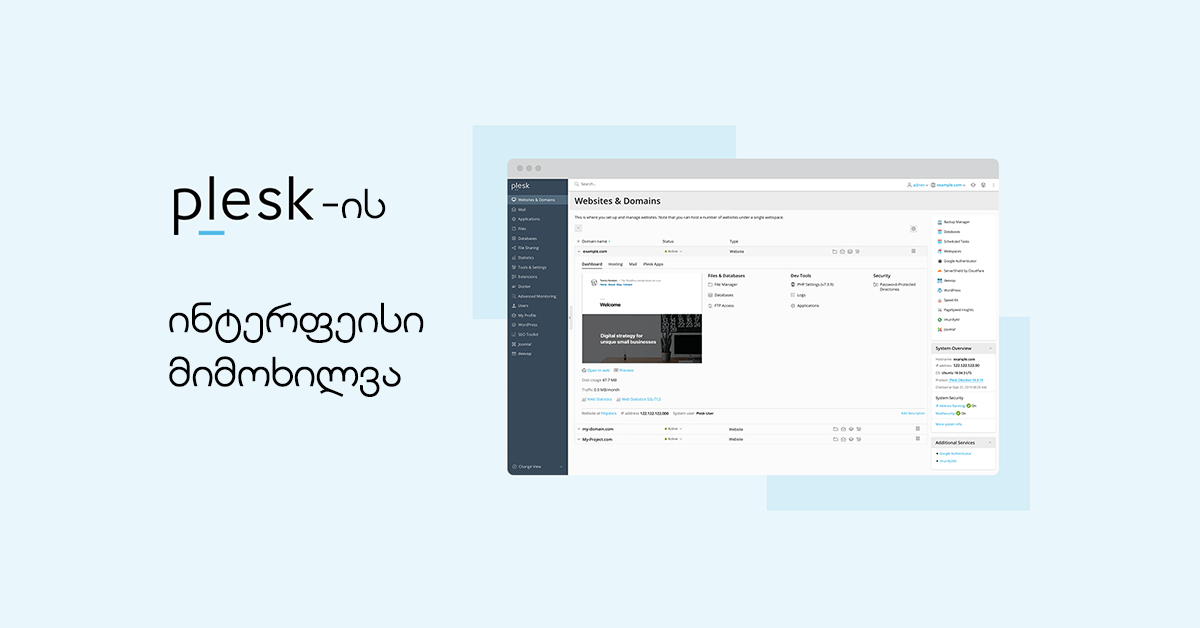
Plesk allows web-hosting users to perform a wide range of management tasks through a graphical control panel. It includes tools for websites, domains, email, databases, files and other hosting functions.
The main interface elements are illustrated below:

- 1. This area displays information about the user signed in to the Plesk control panel and provides access to account-management functions.
- 2. This section contains the Help menu, through which users can access online documentation and instructional material.
- 3. Search field.
- 4. This area contains the main navigation used to organize the different parts of the Plesk interface.
Tools are grouped according to their purpose. Website and hosting controls are available under Websites & Domains, while tools related to mail accounts are available in the Mail section.
A brief description of the main pages and functions:
- 4.1. Websites & Domains: tools for adding and removing domains and subdomains, managing hosting settings, creating and managing databases, changing DNS settings, and securing websites with SSL/TLS certificates.
- 4.2. Mail: tools for adding and removing mail accounts and managing available mail settings.
- 4.3. Applications: tools that allow users to install and manage supported web applications.
- 4.4. Files: the web file manager allows users to upload files to the website and manage files already stored in the hosting account.
- 4.5. Databases: this page allows users to create new databases and manage existing ones.
- 4.6. Statistics: this section provides information about disk and traffic usage and, where enabled, links to web statistics.
- 4.7. Users: tools for adding and removing additional user accounts that can access the Plesk environment according to assigned permissions.
- 4.8. Account: this page provides information about the hosting subscription and available account-level functions, which may include backups and contact-information management depending on the provider configuration.
- 5. This area displays the active Websites & Domains workspace, where the user can access the controls used to manage web hosting.
- 6. This section combines controls and status information related to the currently selected hosting object.